Windows 11 introduction
What is Windows?
- An operating system released by Microsoft in 1985
- A graphical operating system for PCs
- Originally developed as a user interface for MS-DOS
Desktop operating system market share (March 2023 - March 2024)
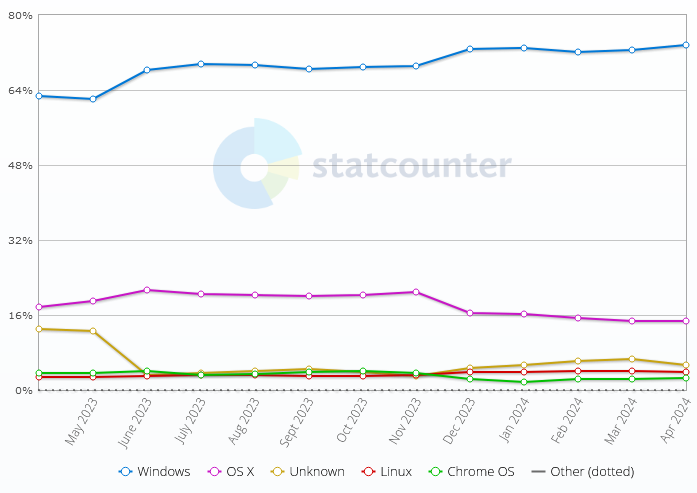
Source: https://gs.statcounter.com/os-market-share/desktop/worldwide
Windows NT version releases
- MS-DOS and the Windows NT kernel are both developed by Microsoft and serve as the foundation for various Windows operating systems.
- They differ significantly in terms of their architecture, features, capabilities, and target environments.
- MS-DOS is a simpler, single-user operating system with limited functionality, whereas the Windows NT kernel is a more sophisticated, multi-user operating system with support for advanced features such as multitasking, memory protection, security, and networking.
MS-DOS based
| Year | Version |
|---|---|
| 1985 | Windows 1.0 |
| 1987 | Windows 2.0 |
| 1988 | Windows 2.1 |
| 1990 | Windows 3.0 |
| 1993 | Windows 3.11 |
| 1995 | Windows 95 |
| 1998 | Windows 98 |
| 1999 | Windows 98 SE |
| 2000 | Windows ME |
NT kernel based
| Year | Version |
|---|---|
| 1992 | Windows 3.1 (NT 3.1) |
| 1994 | Windows 3.5 (NT 3.5) |
| 1995 | Windows 3.51 (NT 3.51) |
| 1996 | Windows 4.0 (NT 4.0) |
| 2000 | Windows 2000 (NT 5.0) |
| 2001 | Windows XP (NT 5.1) |
| 2003 | Windows Server 2003 (NT 5.2) |
| 2006 | Windows Server 2003 R2 (NT 5.2) |
| 2007 | Windows Home Server (NT 6.0) |
| 2007 | Windows Vista (NT 6.0) |
| 2008 | Windows Server 2008 (NT 6.0) |
| 2009 | Windows Server 2008 R2 (NT 6.1) |
| 2009 | Windows 7 (NT 6.1) |
| 2012 | Windows 8 (NT 6.2) |
| 2012 | Windows Server 2012 (NT 6.2) |
| 2013 | Windows 8.1 (NT 6.3) |
| 2015 | Windows 10 (NT 10) |
| 2016 | Windows Server 2016 (NT 10) |
| 2019 | Windows Server 2019 (NT 10) |
| 2021 | Windows 11 (NT 10) |
| 2022 | Windows Server 2022 (NT 10) |
Windows 11 releases
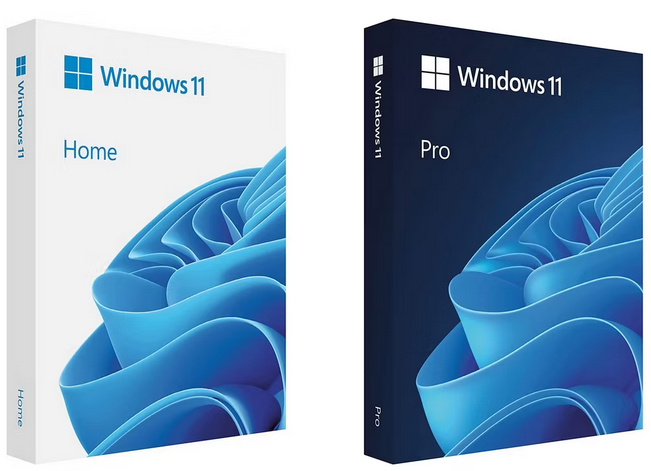
Windows 11 Home
- This edition is targeted towards home users and general consumers.
- It includes all the core features of Windows 11, such as the redesigned user interface, gaming enhancements, and integration with Microsoft services like OneDrive and Microsoft Store.
Windows 11 Pro
- Windows 11 Pro is designed for business users and professionals who require additional features and management capabilities.
- It includes all the features of Windows 11 Home, plus advanced security and management tools like BitLocker encryption, Windows Update for Business, and Hyper-V virtualization.
Windows 11 Enterprise
- Windows 11 Enterprise builds upon the Pro edition with additional security and management features tailored for larger organizations and enterprises.
- It includes features like Windows Defender Application Guard, Windows Defender Credential Guard, and Windows Defender Exploit Guard to provide enhanced protection against security threats.
Windows 11 Education
- This edition is specifically designed for educational institutions, schools, and students.
- It includes all the features of Windows 11 Enterprise, along with additional tools and resources for educators and students, such as Microsoft Classroom and School Data Sync.
Windows licensing models
Retail Licensing
- Retail licensing allows individual consumers to purchase a copy of Windows 11 for personal use.
- Retail licenses are typically sold as boxed copies in stores or as digital downloads from online retailers.
- Retail licenses are usually sold as either a one-time purchase, allowing users to install and use Windows 11 on a single device, or as a subscription model, such as Microsoft 365, which includes Windows as part of a larger suite of productivity tools and services.
OEM Licensing
- Original Equipment Manufacturer (OEM) licensing is intended for computer manufacturers who pre-install Windows 11 on new PCs and devices before selling them to customers.
- OEM licenses are typically sold in bulk to hardware manufacturers at a discounted price and are tied to the specific hardware on which they are installed.
- This means that OEM licenses are non-transferable and cannot be used on other devices.
Volume Licensing
- Volume licensing is designed for businesses, educational institutions, and other organizations that need to deploy Windows 11 across multiple devices.
- Volume licensing offers flexible options for purchasing and managing Windows licenses in bulk, including Enterprise Agreements, Open License agreements, and subscription-based models like Microsoft 365.
Subscription Licensing
- Microsoft offers subscription-based licensing models for Windows 11 through services like Microsoft 365.
- Subscriptions provide users with access to the latest version of Windows, along with additional features and services such as cloud storage, productivity apps, and security tools, for a monthly or annual fee.
System information
- There are couple of useful built-in tools in Windows 11 for presenting information about the system such as installed hardware, operating system version etc.
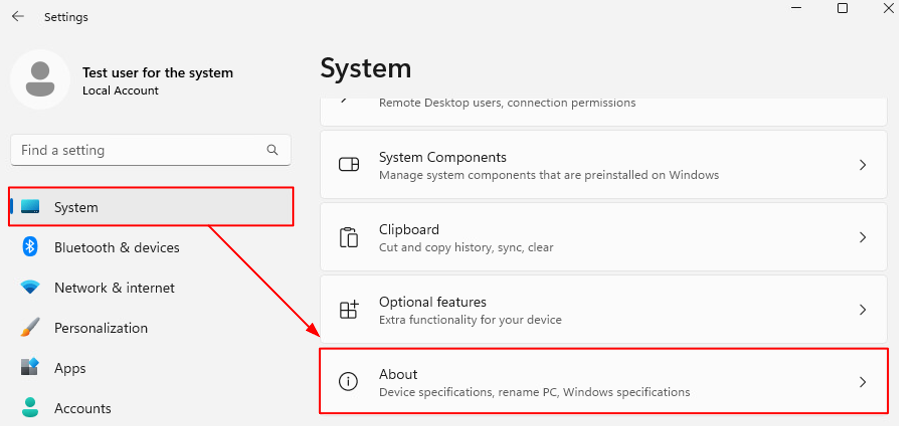
- Brief system information can be found by opening Windows 11 settings menu, selecting System from the left and then About from the bottom of the page (see example image below).
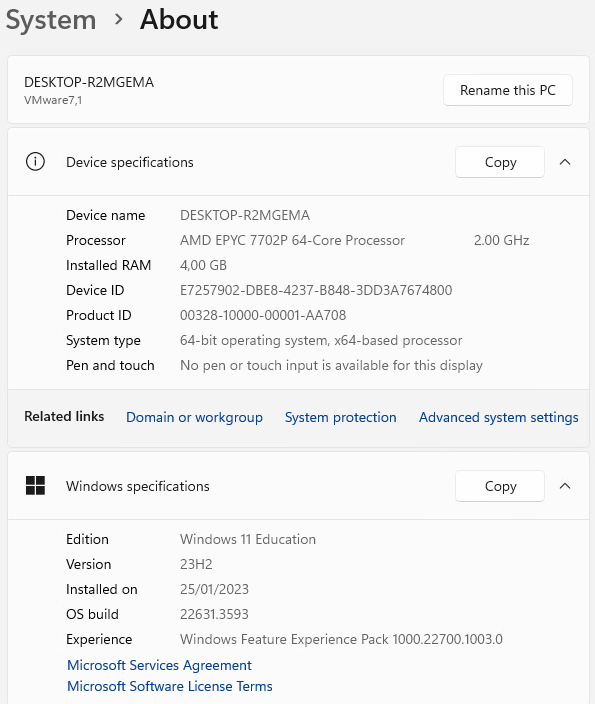
- Device and operating system related brief information is presented in the opening view as can be seen from the example image below.
- In addition, device name can be modified through this view.
- Windows also has the System information tool which can be used to retrieve more comprehensive information about the system.
- Below is the example image presenting the front page of the tool.
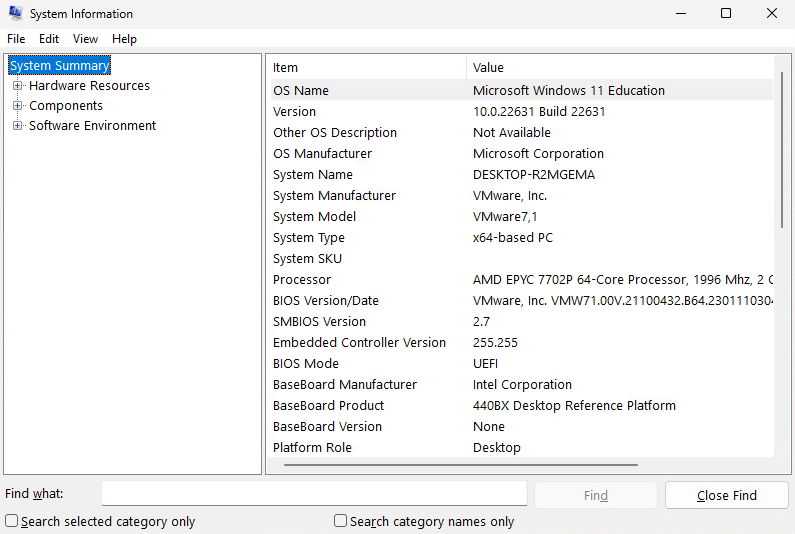
- Tree like navigation menu is located on the left side of the tool which can be used to retrieve more detailed information from the system.
- Tool also has the search feature presented at the bottom as shown in the example image below.
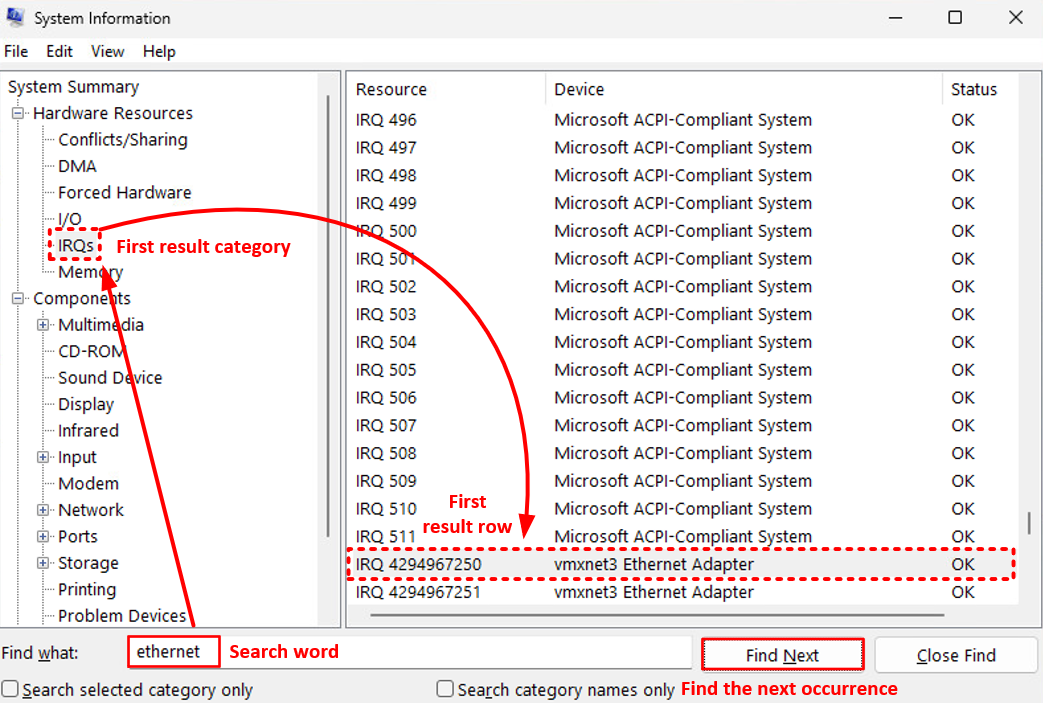
- The search feature can be used to find one occurrence of the given search word at the time while traversing the tree view from top to bottom.
Command prompt
- The Command Prompt, often referred to as cmd or cmd.exe, is a command-line interpreter application available in most Windows operating systems.
- It provides a text-based interface for users to interact with the operating system by executing commands.
- Command prompt can be started by typing cmd in the search field in taskbar.
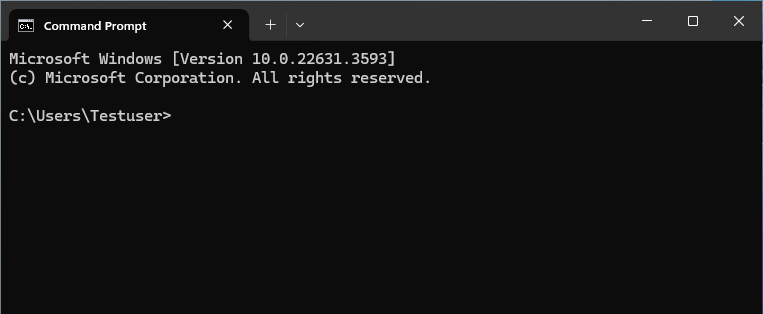
-
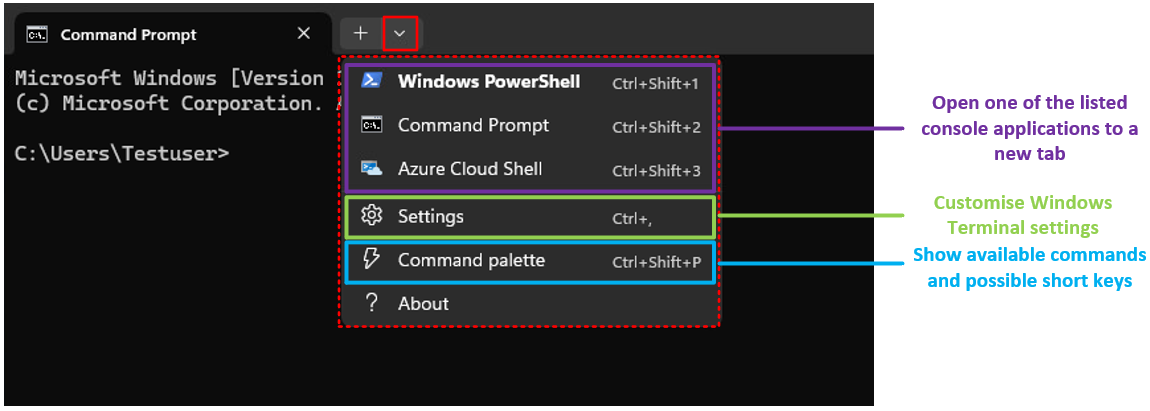
Windows 11 introduced some new enhancement to the traditional command prompt, (as it runs in terminal by default) such as
- Tabs (users can open multiple tabs to same CMD window)
- Customisation (appearance of CMD can be widely customised)
- PowerShell integration (PowerShell can be opened in a new tab in same terminal windows as CMD) and you can run Powershell in CMD with command: powershell
-
Starting from Windows 11 22H2 version, Windows Terminal is the default host application for the console windows.
- This means that CMD, PowerShell and other console applications will be hosted inside Windows Terminal.
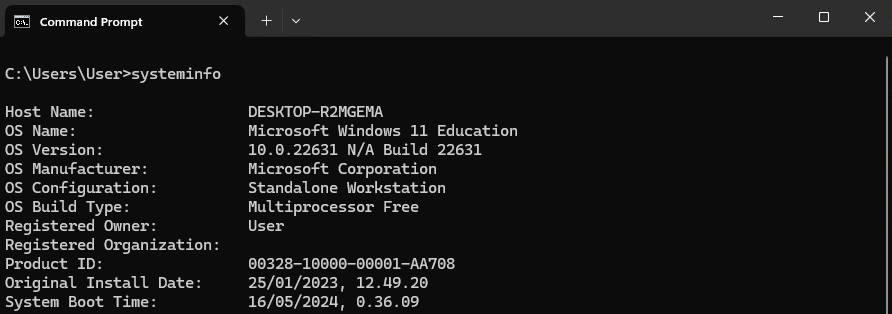
- Command prompt can be used to retrieve system information somewhat similar what was presented earlier in System information section
- This is presented in the example image below
- MS-DOS commands will be used in throughout the different themes in this course.